
Almost every useful piece of software starts with a simple idea.
A business owner may want to manage daily operations without endless spreadsheets. A school may need a better way to track attendance and student records. A startup may imagine an application that solves a problem people face every day.
At first, these ideas often exist only in someone’s mind, a notebook, or a conversation. But how do they become real software that people can actually use?
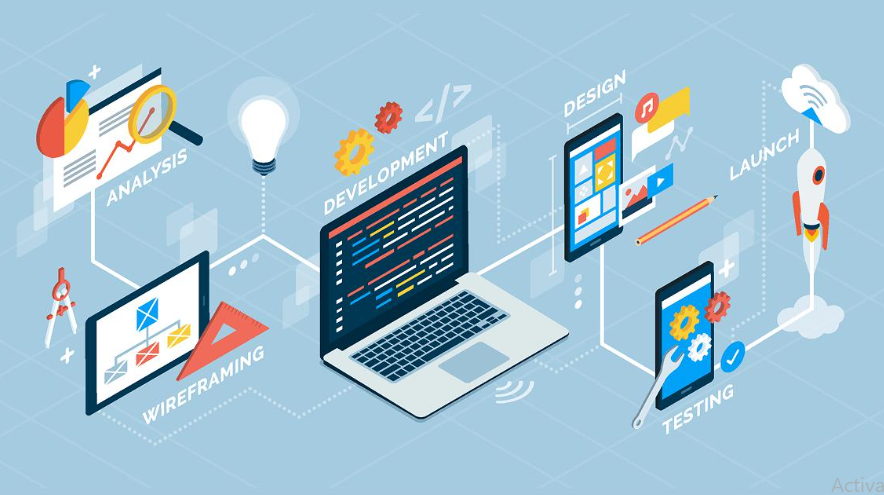
The journey involves much more than writing code. It requires understanding the problem, planning the right solution, designing a user-friendly experience, developing the features, testing everything carefully, and improving the product after launch.
In this guide, we will explore how an idea becomes software, step by step, and why every stage matters when building a reliable digital solution.
1. Every Software Product Starts With a Problem
Before developing software, it is important to understand why it is needed in the first place.
Think about a business that manages customer information, payments, inventory, and employee records using different spreadsheets. As the business grows, this approach can become confusing. Information may get duplicated, reports may take hours to prepare, and small mistakes can affect daily operations.
The first step is not to start coding. It is to identify the problem clearly.
Questions worth asking include:
- What problem are we trying to solve?
- Who will use the software?
- How is this task currently being handled?
- What difficulties do users face with the existing process?
- What would make their work easier?
Answering these questions gives the development team a clear direction. Instead of building software simply because an idea sounds interesting, the team can focus on creating something that solves a genuine need.
Good software begins with a clear purpose.
2. Turning the Idea Into a Clear Plan
Once the problem is understood, the next step is to turn the idea into a practical plan.
At this stage, the team decides what the software should do, which features are necessary, and how users will interact with it.
For example, imagine a business wants to develop a custom inventory management system. The initial idea might be to keep track of products. After discussing the requirements, the team may identify several useful features, such as:
- Product and stock management
- Supplier information
- Purchase and sales records
- Low-stock notifications
- User roles and permissions
- Reports and dashboards
Not every feature needs to be developed immediately. The team must distinguish between essential features and improvements that can be added later.
This is where requirements gathering and project planning become important. They help establish a realistic scope, development priorities, estimated timeline, and budget.
A well-planned project is easier to manage because everyone understands what needs to be built and why.
3. Researching Users and Choosing the Right Solution
Software should fit the people who will use it, not force them to change every part of their workflow unnecessarily.
That is why understanding the target users is an important part of the process.
Developers and project managers may study existing tools, talk to potential users, review competitors, and identify gaps in current solutions. This helps them understand what users actually need rather than relying entirely on assumptions.
The team must also decide what kind of software is suitable for the idea.
Depending on the requirements, the solution might be:
- A website or web application
- A mobile application
- A cloud-based SaaS platform
- An internal business management system
- A custom software solution for a specific industry
For instance, a company that needs employees to access information from different locations may benefit from a cloud-based application. A business with a very specific workflow may need custom software development instead of an off-the-shelf product.
The right choice depends on the problem, users, security requirements, budget, and plans for future growth.
4. Designing How the Software Will Look and Work
Once the requirements are clear, the idea begins to take a more visible form through UI and UX design.
UI stands for User Interface, which covers the visual elements users interact with. UX stands for User Experience, which focuses on how easy and comfortable the software is to use.
The design process may include wireframes, screen layouts, navigation structures, clickable prototypes, and visual designs.
For example, a school management system may need separate dashboards for administrators, teachers, students, and parents. Each user should be able to find the information relevant to them without navigating through unnecessary screens.
A good design considers questions such as:
- Can users understand the interface without extensive training?
- Are important features easy to find?
- Does the application work well on mobile devices?
- Are forms and navigation simple to use?
- Can users complete their common tasks without confusion?
Designing before full development helps the team identify usability issues early. Making changes to a prototype is generally easier than rebuilding a feature after it has already been coded.
The goal is not just to make software look attractive. It is to make it practical and easy to use.
5. Choosing the Technology and Building the Software
This is the stage many people immediately associate with software development: writing code.
However, the technology used should be selected according to the project’s actual needs. There is no single programming language or framework that is best for every application.
A development team may use technologies such as JavaScript, React, Angular, Node.js, PHP, MySQL, or cloud services, depending on the requirements.
During development, the team converts the approved designs and requirements into working features.
For example, an online booking application might need:
- User registration and login
- A database to store customer and booking information
- An interface for selecting available slots
- Notifications and booking confirmations
- An administrative dashboard
- Secure APIs to connect different parts of the system
These components must work together correctly. The front end provides the user interface, the back end handles application logic, and the database stores and retrieves information.
Developers often work in smaller stages rather than building everything at once. This makes it easier to review progress, identify problems, and collect feedback before moving to the next feature.
When a project requires functionality tailored to a company’s operations, custom software development allows the solution to be designed around those specific requirements.
6. Testing the Software Before Launch
A feature that works during development is not automatically ready for real-world use.
Before launching the software, the team needs to check whether it behaves as expected under different conditions.
Software testing may include:
Functional testing: Checking whether each feature works according to the requirements.
Usability testing: Understanding whether users can navigate the software easily.
Performance testing: Checking how the application behaves under different workloads.
Security testing: Looking for weaknesses that could expose data or allow unauthorized access.
Compatibility testing: Verifying that the software works across supported browsers, devices, and operating systems.
Consider an online booking system. It may appear to work perfectly when one person makes a booking. But what happens if two people try to reserve the same slot at the same time? Does the system prevent duplicate bookings? Does the user receive the correct confirmation?
These are the kinds of issues that testing helps uncover.
Bugs and unexpected behavior are a normal part of software development. The important thing is to identify and fix them before they create bigger problems for users.
7. Launching the Software
After development and testing, the software can be prepared for release.
The launch process may involve configuring the hosting environment, connecting the domain, setting up the database, enabling security certificates, preparing backups, and checking production settings.
The team also needs to ensure that essential monitoring and error reporting are in place.
For business applications, user training and documentation may be equally important. Even well-designed software can be difficult to adopt if employees do not understand how to use it.
Some projects launch all at once, while others release a minimum viable product (MVP) first. An MVP includes the essential features needed to solve the main problem and allows the team to learn from actual user feedback.
Launching an MVP can be particularly useful for startups and businesses that want to validate an idea before investing in a larger product.
The first release is an important milestone, but it is not necessarily the end of development.
8. Collecting Feedback and Improving the Product
Once people begin using the software, the team can learn things that were difficult to predict during planning.
Users may request a simpler workflow, report an issue, or suggest a feature that could save them time. Analytics and support requests can also reveal where people struggle or which features they use most often.
This feedback helps the team prioritize improvements.
For example, after launching an employee management system, a business might discover that managers spend too much time preparing monthly attendance reports. The development team could then improve reporting or introduce an automated export feature.
Post-launch work may include:
- Fixing bugs and resolving technical issues
- Applying security updates
- Improving speed and reliability
- Adding useful features
- Updating the software as business needs change
- Monitoring backups and system performance
Regular maintenance keeps the application useful and helps it adapt as the organization grows.
Software is not always a one-time project. In many cases, it becomes an ongoing process of learning, maintaining, and improving.
9. How Long Does It Take to Turn an Idea Into Software?
There is no fixed timeline for every software project.
A simple application with a limited number of features may take a few weeks, while a complex business platform with multiple integrations, advanced security requirements, and different user roles may take several months or longer.
The timeline depends on factors such as:
- The complexity of the requirements
- The number of features and integrations
- The availability of designs and project information
- The size and experience of the development team
- Testing and security requirements
- Feedback and changes during development
A clear scope and realistic priorities can make the process more predictable. However, rushing planning or skipping testing to meet an arbitrary deadline may create more problems later.
It is usually better to develop the right features in a structured way than to build everything quickly without understanding how it will work in practice.
10. Why the Right Software Development Partner Matters
Having a great idea is a good starting point, but turning it into reliable software requires technical knowledge, planning, communication, and ongoing support.
A suitable software development partner should take time to understand the business problem before recommending a solution. They should explain the development approach, discuss priorities, set realistic expectations, and keep the client informed about progress.
Before choosing a development company, consider its technical capabilities, relevant experience, communication process, approach to testing, security practices, and post-launch support.
It is also helpful to ask how changes in requirements will be handled and how the software can accommodate future growth.
For businesses that need a solution designed around their own processes, working with a team experienced in custom software development can help bridge the gap between an initial idea and a practical digital product.
At SS Informatics, the goal is to help businesses explore technology-driven solutions that support their operational needs and long-term objectives. The right starting point is always a clear understanding of the problem the software is expected to solve.
Conclusion
Every successful software product begins with an idea, but it takes several carefully connected steps to turn that idea into something useful.
The journey starts by identifying a problem, understanding users, planning the requirements, and designing a suitable experience. Development brings the idea to life, testing helps ensure reliability, and launch makes the product available to users. Feedback and maintenance then help the software improve over time.
The most important lesson is that good software is not simply about writing code. It is about solving the right problem in a way that works for real people.
If you have an idea for a business application, a web platform, or a custom digital solution, start by defining the problem and the outcome you want to achieve. With the right planning and development approach, an idea can become a practical tool that makes everyday work easier.
Have a software idea in mind? Connect with SS Informatics to discuss your requirements and explore a suitable software development approach for your business.
Cloud & IT Solutions: The Complete Guide to Accelerating Business Growth in 2026How Custom Software Development Helps Businesses Grow in 2026