What is ERP?
Running a business today is much more complicated than it was a decade ago. Companies have to manage customers, employees, inventory, suppliers, accounts, projects, payroll, sales, marketing, and many other operations simultaneously. Handling all these processes using separate software or spreadsheets often leads to confusion, duplicate work, and costly mistakes.
This is where ERP (Enterprise Resource Planning) software becomes essential.
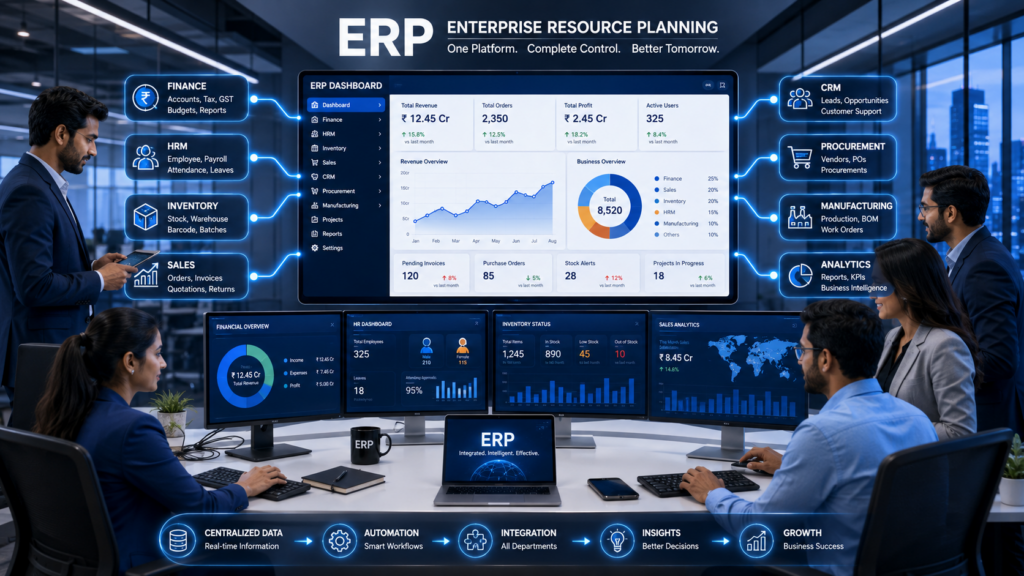
An ERP system acts as the central nervous system of a business by bringing every department onto one integrated platform. Instead of different teams working with different databases, everyone accesses the same real-time information, making operations faster, smarter, and more efficient.
Whether you’re a startup, SME, manufacturing company, educational institution, healthcare organization, retail business, or enterprise, ERP software can significantly improve productivity and decision-making.
What Does ERP Stand For?
ERP stands for Enterprise Resource Planning.
It is a business management software that integrates all core business processes into a single centralized system.
Instead of using separate software for:
- Finance
- Human Resources
- Inventory
- Sales
- Customer Management
- Procurement
- Manufacturing
- Payroll
ERP combines everything into one platform.
Simple Definition of ERP
ERP is software that helps businesses manage all their operations from one centralized system using shared data and automated workflows.
Think of ERP as the brain of an organization, where every department communicates through one common database.
Why Do Businesses Need ERP?
Imagine a company without ERP.
The sales team records an order.
The inventory team doesn’t know about it.
Finance creates invoices manually.
HR maintains employee attendance separately.
Management waits days for reports.
The result?
- Delays
- Errors
- Poor communication
- Duplicate data
- Lost productivity
ERP eliminates these problems by connecting every department.
How ERP Works
ERP software uses a centralized database where every department accesses the same information.
Example Workflow:
Customer places an order
↓
Sales Team creates Sales Order
↓
Inventory checks stock
↓
Warehouse prepares shipment
↓
Finance generates invoice
↓
Payment updates accounting
↓
Management dashboard updates automatically
Every department works using the same real-time information.
Major ERP Modules
1. Finance & Accounting
This module manages:
- General Ledger
- Accounts Payable
- Accounts Receivable
- GST
- Tax Management
- Financial Reports
- Budgeting
Benefits:
- Accurate accounting
- Faster financial reporting
- Better cash flow management
2. Human Resource Management (HRM)
Includes:
- Employee Records
- Payroll
- Attendance
- Leave Management
- Recruitment
- Performance Evaluation
Benefits:
- HR automation
- Better employee management
- Reduced paperwork
3. Inventory Management
Tracks:
- Stock Levels
- Warehouse
- Products
- Purchase Orders
- Barcode
- Batch Tracking
Benefits:
- Prevent stock shortages
- Reduce overstock
- Real-time inventory visibility
4. Sales Management
Handles:
- Quotations
- Sales Orders
- Invoices
- Customer Orders
- Returns
- Sales Reports
Benefits:
- Faster sales process
- Better customer service
- Increased revenue
5. CRM (Customer Relationship Management)
Stores:
- Leads
- Customers
- Opportunities
- Follow-ups
- Support Tickets
Benefits:
- Better customer relationships
- Improved sales conversion
- Personalized communication
6. Procurement
Manages:
- Vendors
- Purchase Requests
- Purchase Orders
- Supplier Payments
Benefits:
- Lower purchasing costs
- Better supplier management
7. Manufacturing
Ideal for factories.
Features include:
- Production Planning
- BOM (Bill of Materials)
- Quality Control
- Machine Monitoring
- Production Scheduling
Benefits:
- Reduced production costs
- Improved efficiency
8. Project Management
Includes:
- Tasks
- Teams
- Timelines
- Budgets
- Resources
Benefits:
- Better collaboration
- Improved project tracking
Key Features of ERP Software
Modern ERP systems offer:
- Centralized Database
- Real-Time Reporting
- Dashboard Analytics
- Workflow Automation
- Multi-User Access
- Cloud Integration
- Mobile Access
- AI-Based Insights
- Role-Based Permissions
- Document Management
- Business Intelligence
- Data Security
Top Benefits of ERP Software
1. Improved Productivity
Automation reduces repetitive tasks and saves valuable employee time.
2. Better Decision Making
Managers receive live dashboards and reports instead of waiting for manual updates.
3. Cost Reduction
ERP minimizes manual errors, operational delays, and unnecessary expenses.
4. Better Customer Service
Employees have complete customer information available instantly.
5. Improved Collaboration
Departments work together using one shared database.
6. Increased Data Accuracy
Everyone uses the same information, reducing duplicate or inconsistent records.
7. Business Growth
ERP supports expansion by handling more users, customers, and processes without major disruptions.
Types of ERP Software
Cloud ERP
Hosted online.
Advantages:
- Lower upfront cost
- Automatic updates
- Remote access
- High scalability
On-Premise ERP
Installed on company servers.
Advantages:
- Full control
- Greater customization
- Internal data management
Hybrid ERP
Combines cloud and on-premise deployment for flexibility.
Industries That Use ERP
ERP solutions are widely used in:
- Manufacturing
- Healthcare
- Retail
- Education
- Logistics
- Construction
- Real Estate
- Pharmaceuticals
- IT Companies
- Government Organizations
- Hospitality
- E-commerce
- Food Processing
- Finance
- Automobile Industry
ERP Implementation Process
Successful ERP implementation typically follows these steps:
- Requirement Analysis
- Business Process Mapping
- ERP Selection
- Customization
- Data Migration
- Employee Training
- Testing
- Go Live
- Continuous Support
Common ERP Challenges
Businesses may encounter:
- High initial investment
- Employee resistance
- Data migration complexity
- Long implementation timelines
- Training requirements
These challenges can be minimized with proper planning and experienced implementation partners.
ERP vs CRM
| ERP | CRM |
|---|---|
| Manages entire business operations | Focuses on customer relationships |
| Covers finance, HR, inventory, production | Covers sales, leads, and support |
| Used by all departments | Used mainly by sales and marketing |
| Improves internal efficiency | Improves customer engagement |
Many modern ERP solutions include CRM functionality, allowing organizations to manage operations and customer relationships from one platform.
How to Choose the Right ERP Software
Before selecting an ERP solution, consider:
- Business size
- Industry-specific requirements
- Budget
- Scalability
- Customization options
- Integration capabilities
- User-friendly interface
- Vendor support
- Security standards
- Reporting features
Future of ERP in 2026 and Beyond
ERP platforms are evolving rapidly with advanced technologies such as:
- Artificial Intelligence (AI)
- Machine Learning (ML)
- Predictive Analytics
- Robotic Process Automation (RPA)
- Internet of Things (IoT)
- Cloud Computing
- Mobile ERP
- Voice Assistants
- Real-Time Business Intelligence
These innovations help businesses become more agile, data-driven, and competitive.Cloud & IT Solutions: The Complete Guide to Accelerating Business Growth in 2026Cloud & IT Solutions: The Complete Guide to Accelerating Business Growth in 2026How Custom Software Development Helps Businesses Grow in 2026Cloud & IT Solutions: The Complete Guide to Accelerating Business Growth in 2026How Custom Software Development Helps Businesses Grow in 2026